Import template for pictures
You download the import template by going to the Import Tool in the menu and clicking on New and then in the Template Type dropdown, choosing Product Images and clicking download file template.
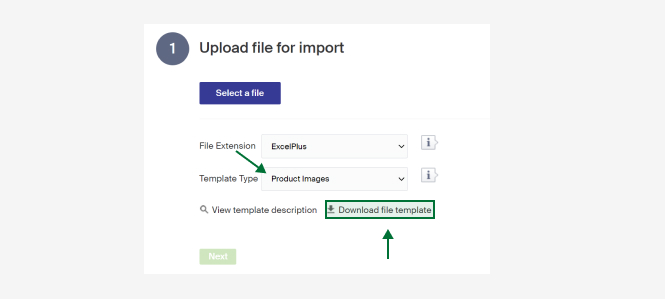
Below is a description of existing columns. (There's also a short description in Merchant Center under View template description)
| Column | Description |
|---|---|
| Id | Id for the product the pictures shall be imported to |
| Name | The product's name. Mandatory if the Id is not filled in. Can be left empty if the Id is there. |
| ImageUrl | Link to the picture that shall be imported. The complete URL must be included. |
| ImageOrder | Placement order of pictures. 0 or blank = the picture will be added last. 1 = the picture will become the main picture and be shown in product listings. >1 = the picture will be ordered with the supplied value. If other pictures already exist at the supplied order value then those pictures and any after them will be bumped up one step. |
Import template for GoogleTaxonomy
This import template makes it possible to easily match your categories in Google Taxonomy. Google Taxonomy lists categories that are used by google to help distribute products in departments in a shopping flow.
Import template for product parameters
Via the import tool you can apply parameters and parameter values to products. This requires that you have created parameter groups and their parameters before.